Deployments
How Clarity Forge handles deployments
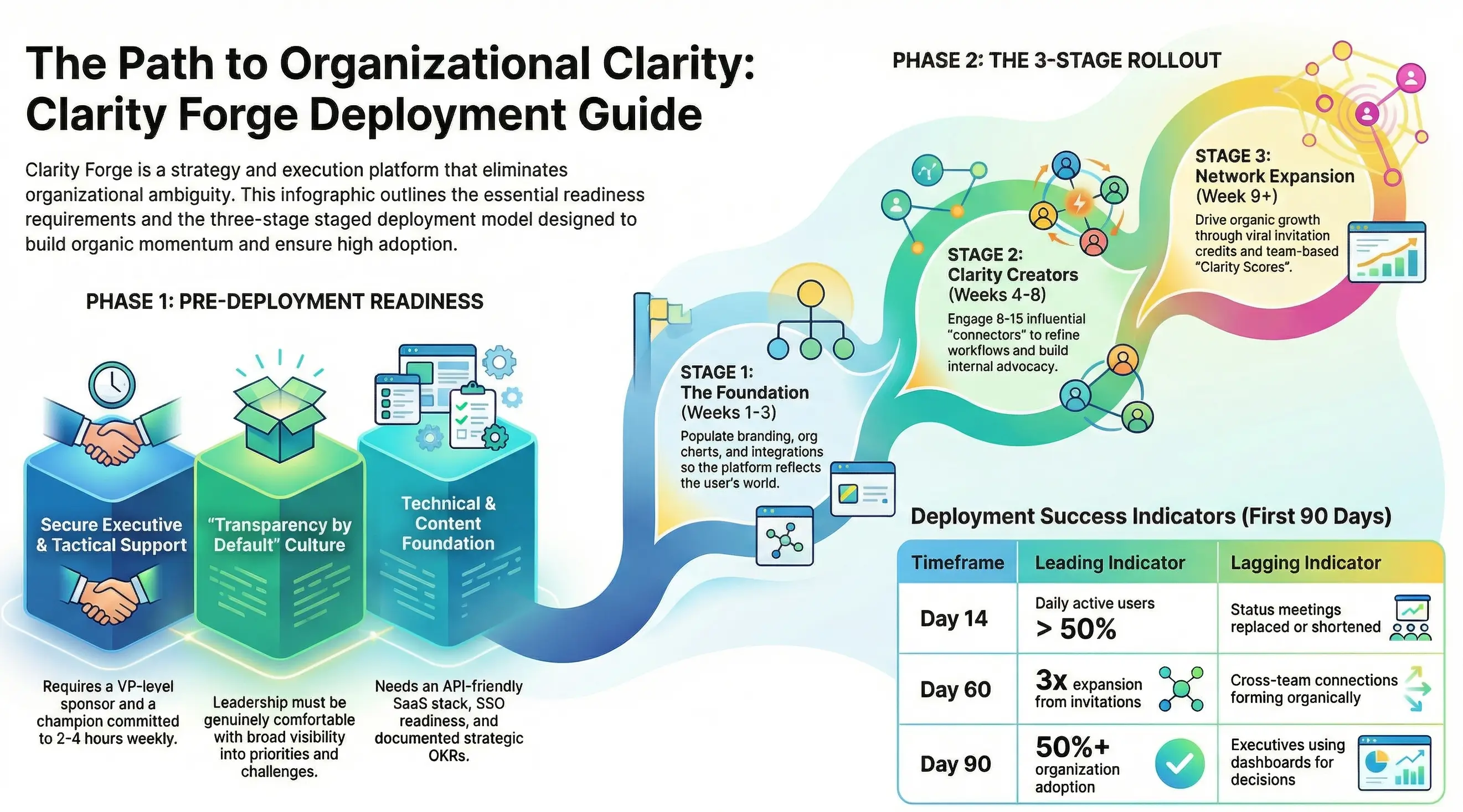
This guide helps you prepare for a successful Clarity Forge deployment. A well-prepared launch dramatically increases adoption rates and accelerates time-to-value. Use this document to assess your readiness and coordinate with your internal stakeholders.
Readiness Checklist
Complete this checklist with your team before kickoff. Items marked with an asterisk (*) are required before we can begin.
People & Sponsorship
- Executive sponsor identified (VP+ level) *
- Day-to-day champion assigned (2-4 hours/week commitment) *
- Cross-functional squad available (ops/compliance, marketing, engineering/data)
- Clarity Creators identified (8-15 people for initial rollout)
Technical Readiness
- Modern, API-friendly SaaS stack in place *
- Willing to connect SSO/webhooks/APIs *
- IT/Security contact identified for integration approvals
- List of existing tools to integrate prepared (project management, docs, comms)
Content & Data
- Company logo available (PNG or SVG, high resolution)
- Brand colour scheme documented (hex codes or brand guide)
- Current org chart accessible
- Strategic priorities/OKRs documented (even if informal)
- List of active projects/initiatives available
Process & Commitment
- Committed to 60-90 day pilot with weekly cadence *
- 3-5 success metrics agreed upon *
- Willing to share basic usage/telemetry data *
- Lightweight procurement path available (NDA + pilot SOW)
- Can respond within 24-48 hours during pilot
Cultural Fit
- Leadership genuinely open to transparency by default *
- Comfortable with async communication
- Open to outcome-based co-marketing if results hit (logo/case study)
How Deployment Works
Clarity Forge deployments follow a staged approach designed to build momentum and demonstrate value before broad rollout. Each stage has specific goals and exit criteria.
Stage 1: Foundation (Weeks 1-3)
Before any users see the platform, we work together to establish the foundation. This stage involves your implementation team (typically 2-3 people) and our support team.
What gets done:
- Branding configuration (logo, colour scheme, terminology)
- Organizational structure populated and refined (e.g. renaming "Jim Johnson's Team" to "Finance")
- Strategic priorities and OKRs loaded into Align
- Key active projects visible in Execute
- Role definitions roughed out in Grow
- Third-party integrations connected (e.g. Google Drive, Asana, Slack) to overcome security hurdles early and seed initial data
Goal: When User #1 logs in, they see their world already reflected back at them.
Stage 2: Clarity Creators (Weeks 4-8)
A carefully selected group of 8-15 users begins using the platform. These aren't guinea pigs—they're co-designers who help shape the experience for your organization.
Selection criteria:
- Report to or work closely with the executive sponsor (political cover)
- "Connectors"—people others watch and follow
- Mix of enthusiasts AND healthy skeptics (skeptics converted become your best advocates)
What happens:
- Weekly feedback sessions to refine the experience
- Identify the specific workflows that deliver the most value
- Build the case studies and talking points for broader rollout
- Clarity Creators become advocates and receive invitation credits for Stage 3
Stage 3: Network Expansion (Week 9+)
Rather than a controlled team-by-team rollout, Stage 3 uses network effects and social dynamics to create organic momentum. The goal is pull, not push—people should want in, not feel forced in.
The Invitation Model:
Each Clarity Creator receives 3-5 invitation credits. When they invite someone:
- The invitee sees a personalized landing: "Here's how your work connects to what [inviter] is already tracking"
- The invitee gets their own invitation credits upon activation
- This creates viral expansion while maintaining quality (people invite colleagues they actually work with)
Network Effects Built In:
- The incomplete picture: When viewing project dependencies, users see which upstream/downstream teams aren't in the system yet. "3 of your 5 dependencies are visible. Invite the others to complete your picture."
- Connection requests: Users can request to link their work to others' projects, creating organic cross-team awareness
- Threshold unlocks: Certain features activate at adoption milestones (e.g. "Org-wide dependency mapping unlocks at 60% adoption")
Healthy Competition:
- Clarity Score: Teams earn scores based on data freshness, completeness and connections—framed as "most prepared" not "best"
- Weekly spotlight: Recognition for teams hitting milestones, shared in company communications
- Progress visibility: Org-wide adoption percentage displayed prominently, creating social proof
Wave Mechanics (Optional):
For larger organizations, expansion can happen in waves with limited seats:
- "Wave 2 opens Monday - 100 seats available"
- Creates urgency and FOMO
- Clarity Creator nominations get priority access
Goal: Adoption feels inevitable rather than imposed. Users pull their colleagues in because it makes their own experience better.
What Success Looks Like
We'll agree on specific metrics before kickoff, but here's what healthy deployments typically show:
| Timeframe | Leading Indicators | Lagging Indicators | Watch For |
|---|---|---|---|
| Day 7 | 80%+ Clarity Creators logged in | First "aha" moments reported | Confusion about navigation or terminology |
| Day 14 | Daily active > 50% of Clarity Creators | First status meeting replaced or shortened | Data going stale; login dropoff |
| Day 30 | Clarity Creator NPS > 30; first invitations sent | Decisions documented in-platform | Shadow systems emerging |
| Day 60 | 3x expansion from invitations | Cross-team connections forming organically | Invitation hoarding; uneven adoption |
| Day 90 | 50%+ org adoption | Executives using dashboards for decisions | Gamification fatigue; score-chasing without substance |
Challenges We'll Navigate Together
Every deployment faces predictable challenges. Knowing them in advance helps us address them proactively.
The Cold Start Problem
The platform isn't valuable until it has data, but people don't want to add data until it's valuable. This is why Stage 1 matters so much—we pre-populate enough that users see immediate value on first login.
The Middle Manager Question
Mid-level managers sometimes worry that transparency reduces their influence. We address this by showing them how Clarity Forge makes their job easier before it makes their team's work more visible. They get dashboards that help them manage up and demonstrate their impact.
Shadow Systems
People naturally drift back to familiar tools. The network effects in Stage 3 help counter this—Clarity Forge becomes more valuable than alternatives precisely because others are using it. The "incomplete picture" mechanic creates ongoing pull back to the platform.
The Compliance Trap
If "updating Clarity Forge" becomes a checkbox, the system becomes a graveyard of shallow data. We never frame updates as the goal. Instead, we focus on better meetings, faster decisions and clearer accountability—with Clarity Forge as the enabler. The Clarity Score rewards substantive engagement, not just logging in.
Gamification Fatigue
Leaderboards and scores can backfire if they feel like pressure rather than play. We design for intrinsic motivation (seeing your work in context, connecting with colleagues) with gamification as amplifier, not driver. We'll monitor for signs that competition is creating resentment rather than energy.
A Note on Transparency
Clarity Forge is built on transparency by default.
Most organizations try to control information flow through permissions—deciding in advance who should see what. The problem is that nobody can predict who will need access to which information. A decision made in Finance affects Engineering. A delay in one project creates risk for three others. A new hire needs context that nobody thought to share. Permission-based systems fail because they assume we can design access around needs we can't foresee.
Transparency by default flips this model. Information is visible unless there's a specific reason to restrict it. This means:
- Connections you didn't know existed become visible
- Duplicate work gets discovered before it's too late
- Context flows to people who need it without someone deciding they need it
- The organization's actual structure and priorities become legible to everyone
This requires cultural readiness. If leadership isn't genuinely comfortable with broad visibility into priorities, progress and challenges, Clarity Forge will create friction rather than clarity. We'd rather discover that mismatch early than struggle through a deployment that can't succeed.
When Clarity Forge Isn't the Right Fit
We've learned that some situations make successful deployment unlikely. We're transparent about these upfront:
- Primary goal is custom software development or heavy professional services
- No executive sponsorship or champion lacks sufficient bandwidth
- Cloud hosting is not permitted
- Transparency by default is culturally incompatible with how leadership operates
If any of these apply, we're happy to have a conversation—but we want to set realistic expectations about what's achievable.
Next Steps
- Complete the readiness checklist above
- Identify your executive sponsor and day-to-day champion
- Draft your initial list of Clarity Creators
- Schedule a readiness call to discuss your specific context
Questions? Ready to get started?
Contact us at sales@clarityForge.ai.
About the Author
 Michael O'Connor
Founder of Clarity Forge. 30+ years in technology leadership at Microsoft, GoTo and multiple startups. Passionate about building tools that bring clarity to how organisations align, execute, grow and engage.